
1. First we have to change units of our scene to Centimeters.

2. Next we set Grid Spacing.

3. In top view we create the shape of room - using basic Line.

4. Next we have to add Extrude modifier to our new object with Amount = 260 cm.

5. Now, lets convert our object to editable poly. To make this we have to clik right mous button and choose Convert To: Convert To Editable Poly.

6. Now select all polygons and invers them using Flip function.

7. With all polygons selected we have to cut our object - red arrows - using Quick Slice tool.

8. Now choose marked polygon.

9. Use Extrude tool with Extrusion Height set on -25 cm. After extrusion we have to delete this polygon. Thanks to this we made a place for some basic window.

10. In front view, using rectangle 3 times, we have to draw our primitive window. Remember to turn Start New Shape option off - thanks to this our 3 objects will be connected.

11. Now we add a simple Plane - it will be our glass - and we place it exactly like it is shown on the image below.

12. Create a Camera.

13. Now, we have to add correct material ID to applicable polygons - everything is shown on next 3 images.


14. Now, it is time to create some materials" ID 1 is a simple vray material with diffuse color RGB=250, this same with ID 2 but with diffuse color RGB=150.

15. Window frame is made wit this same material as walls. Glass material you can see below.

16. Now it is time to add some furniture to our scene:) I do not want to lose time for modeling them so I'll use already made models from Evermotion collections: Armchairs and table are from
Archmodels vol.1 collection, vases, cups, window-blind and sculpture come from
Archmodels vol.2 collection and lamps from upcomming Archmodels vol.4 collection.

17. some materials:

18. To light our scene we will use photometrical lights. You will need web file that can be downloaded
HERE . So place some light in the scene and give correct path to the web file.

19. We want our light to be placed exactly like halogen, so we have to use Align tool. To make it we have to select our light and clik on Align icon or press Alt+A keys on the keyboard. Next we have to choose one of lamp elements (in that case glass of halogen). On the sceenshot you can see all parameters that should be set.

20. It could happend that you will have to rotate the light for 180 deegree. In that case remember to change coordinate system to Local.

21. Next we have to make this same for all other halogens and lamps in the room.

22. Now it is time fo rendering options. Press F10, and choose Vray as a renderer (I used version no.1.47.03). On the screens below you can find all rendering settings.


23. And here you can see our final results.
 >> DOWNLOAD SCENE HERE






 Customer zone
 Your orders
 Edit account
 Add project
 Liked projects
 View your artist profile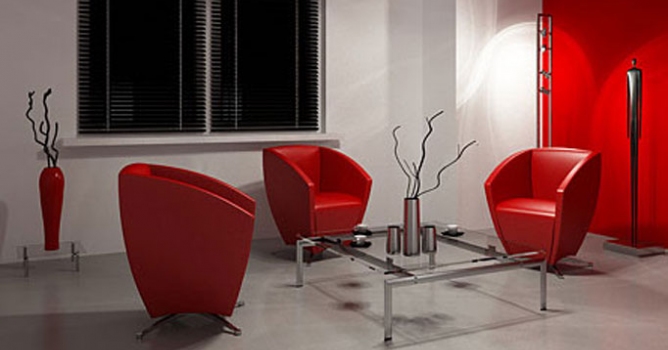














COMMENTS