Evermotion: More Than an Asset Library
How Evermotion became a full-scale production partner for archviz, automotive and synthetic data.


Total: € 0
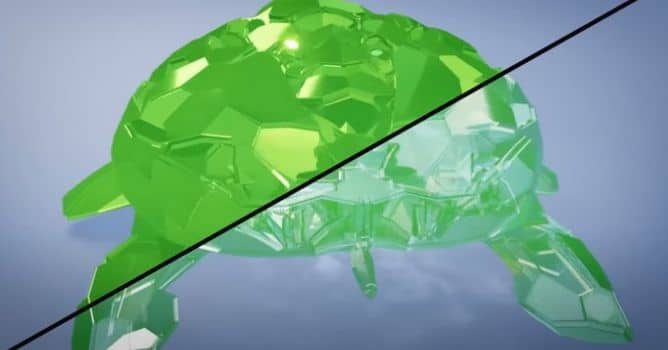

Creating realistic glass in Eevee can feel like solving a puzzle, especially because this real-time engine doesn’t offer physically accurate refraction like Cycles. Still, with the right approach, you can simulate the look convincingly using a custom shader and advanced material settings. Jonathan Lampel’s detailed tutorial dives into a complete node setup that brings believable transparency and reflection effects to life. The key steps include configuring Alpha Blend or Alpha Hashed blend modes, enabling Screen Space Refraction, and fine-tuning the Shadow Mode for realistic depth. Understanding the limitations of the default Glass BSDF in Eevee is crucial, as its simplicity doesn’t account for light absorption, RGB splitting, or caustic effects. A custom shader built with Transparent BSDF, Glossy, Fresnel, and Layer Weight allows far greater control over the final look. Every tweak impacts the clarity, color, and realism of the result.
To push your glass shading further in Eevee, the shader needs to go beyond basic transparency. Jonathan Lampel walks through techniques for simulating chromatic dispersion (the RGB split) and directional absorption based on object thickness. These additions elevate the realism, helping to mimic how real glass interacts with light. Refractive and non-refractive layers can be combined in one material, giving you fine-grain control over reflections, color, and shadow behavior. Tricks like simulating caustics through spotlight placement and alpha-hashed shadows give your renders more complexity without heavy computation. Analyzing and comparing other community glass shaders makes it clear how each approach balances realism and performance. The included node group breakdown and the downloadable shader offer practical value for artists focused on architectural visualization. With smart configurations, Eevee becomes a powerful tool for polished, photoreal glass results—no need for full ray tracing.


LEAVE A COMMENT





|

|

|

|

|
 Customer zone
 Your orders
 Edit account
 Add project
 Liked projects
 View your artist profile
COMMENTS