We use cookies to provide you with the best possible experience. They also allow us to analyze user behavior in order to constantly improve the website for you.
The consent is voluntary. You can withdraw it at any time or renew it in Cookie settings on the home page. Withdrawal of your consent does not affect the lawfulness of processing performed before the withdrawal.
Privacy Protection Policy
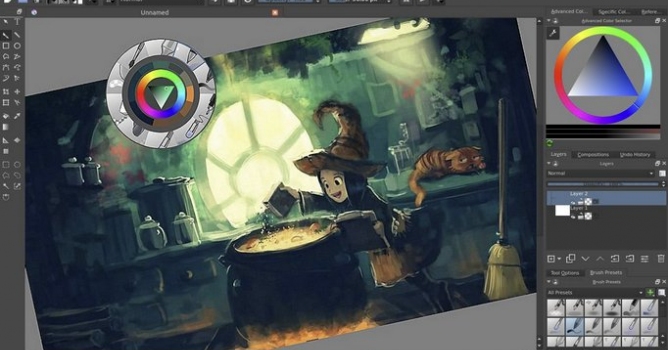
Krita is the free and open source painting application used by artists all over the world.
You can now do proper frame-by-frame animation in Krita. Multiple layers, all sorts of playback speeds, onion skinning, on top of all of Krita’s existing paint tools: It’s enough to make any animator’s fingers itch!
Animatable raster layers – Animated raster images with frames, and use the time-line docker to order them. Works in all color spaces and depths as well!
Onion skinning – This allows you to have an overlay of the previous and next frames, an important assistant when going from rough animation to smooth animation!
Importing image sequence – Import any set of images as an animated layer, automatically sorted by naming scheme.
Exporting image sequence – Export the whole animation as an image sequence, for further processing in other programs.
New dockers – timeline docker, animation docker, and animation workspace
CSV import and export – for layered animation, for use with TV-paint, or Blender via a plugin, courtesy of Laszlo Fazekas
Spriter scml exporter – Make the base image in Krita and then export it to this powerful cut-out animation tool for games.
Caching for Animation playback – Proper animation playback, in all sorts of frame-rates, relative speed-ups
Instant Preview for Big canvases! – Utilizing the power of OpenGL 3.0 you can now draw smoothly with 1000 pixel width brushes!
Frame dropping – For slower devices, we implemented frame-dropping, so that you can always see your animation at real-time speed!
Simplified merging – One hotkey to rule them all!
Multi-Layer Mania – Krita 2.9 had multi-layer selection and dragging and dropping. We spent this release expanding this functionality with moving, on canvas-selecting, merging, duplicating and more!
Quick select layers – Select All/Visible/Locked layers, or select them on-canvas via Shift+R+Click
Mass editing layer properties – Instantly rename multiple layers, or change their blending mode, or opacity, or any other property.
Group multiple layers – Or create Clipping Groups or just ungrouping with hotkeys.
In this walkthrough, we guide you through the process of building a polished 3D interior scene inspired by the cover of Archmodels vol. 306 – Table Sets.










 Customer zone
 Your orders
 Edit account
 Add project
 Liked projects
 View your artist profile
COMMENTS