THIS IS OLD TUTORIAL. IT CAN BE DISPLAYED WRONG OR CORRUPTED - IF SO PLEASE CONTACT US


INTRODUCTION
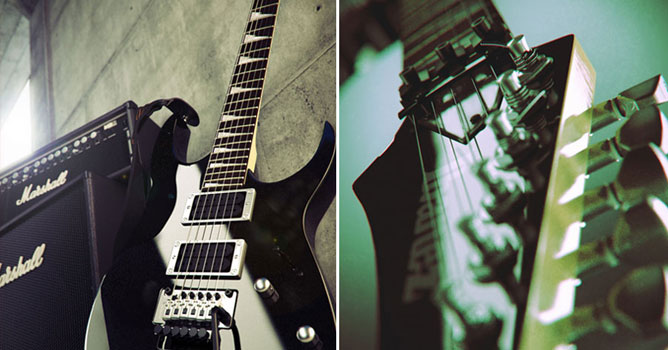
This is an old project started about year ago and finished recently. I spent almost all my free time during a year with interruption form half a year to one month. I hadn't any concept, only some vision in mind. It's not a good way to start project without certain conception, but I used to. So I made many unused textures models and etc., but actually I doesn't worry about wasted time - anyway it gave me some expirience.

MODELING
It was important to me to make very accurate model, even if not will be visible in final, so I wasn't surprised when it realy happened. At the same time I was sure - any position of cameras cannot uncover parts with too little details, cause I haven't such.

The fist thing I did is have take photos of my own guitar for using its as references and source for textures. Than I draw small sketches of all small details and marked all necessary measurements.
The front view photo I took from Ibanez website, although its was not exact my guitar but enough alike. It was simpler then tring to take good, not distorted photo.

Of course it hasn't sense to talk about modeling process, even if it took most time. Modeling in Modo not to much differ from other similar software, but in my opinion it's faster and I just enjoy it.


MAPPING/TEXTURING
Mapping also didn't have any issues. Only some object have certain unwrap, other have simple box or planar mapping or haven't any mapping.

some of textures:

Some of used materials:


ENVIRONMENT
Actually it's not first variant of environment. Also I had 3 unsuccessful attempts. As I said, it's not a good way to start project without certain conception.

All light sources is simple plane object with MaxwellMaterial emitter. I used place highlight tool in max to make nice reflected light source on object in certain spot. I don't used skylight and sun because it not affect final lighting but it slowdown render.
The part of the wall was subdivided for noise modifier, that affect very little so the wall wasn't too flat.

As you can see, the general image, (guitar with amplifier) don't make it possible to see all the details. So it was good idea to make additional renders, but in different environment - something like studio.

POSTPROCESSING
Most likely postprocessing was quickest and easier stage. I used only Curves for colorcorrection with settings like on image below. It makes green hue at all and some blue in shadows:


and also I used 'Filter>Distortion>Lens Correction' with set up Chromatic Abberation (+6 and -6) and Vignette. Postprocessing step by step:


AUTHOR INFO
 
add comment
comments
2010.11.25
soo nice man i like this >>>>>> thanx :((((((((((
2009.07.06
Hi, can we get the scene file somewhere? Thanks a bunch
©Evermotion 2009 - all rights reserved - copying and publishing without permission is forbidden.
EVERMOTION s.c., ul. Przedzalniana 8, 15-688 Bialystok, NIP: 542-291-02-99, ph.: +48 85 674 50 05, fax: +48 85 653 3620 POLAND. Our office is open from 8am to 4pm (+1.00 GMT)
Facebook icon