animation: SimCloth Flag
written by: Martin

06-7-2004
info@evermotion.org

For many cloth animation is probably the hardest thing to do. I agree it is very difficult to do, but with the right amount of know how you can create a realistic looking cloth effect with very little effort using SimCloth. Here I will show you how to create a flag using SimCloth by Chaos Studios. The objective of doing this tutorial was to create a piece of cloth attached to a pole that when act as a flag when ever the pole was moved.


Create a plane that will act as you floor for the scene


Create a cylinder that will act as our pole in the scene, convert it to and editable poly, and name this model pole.


Create another plane but this time in the Front Viewport with a length and width segments set to 15 , convert this to and editable poly and name it flag. Select all of the faces on the flag model and select extrude, do not extract too much we still want this to be cloth, so only exctract a little bit.


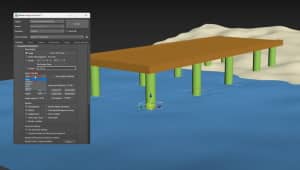
Add a SimCloth Modifier to the Flag Model and select the vertex menu from the sub-selection menu
Select the vertecies closest to the pole and click the new button to add this selection to a group , rename this Pole Connect, also turn off collisions because we do not want the flag colliding with the pole inside of the pole.
Click the attach box and click the pole to connect the verticies to the pole
Go back to the main SimCloth Menu and select the cloth selection under the object type menu
Leave all the settings as their defaults but turn on check for intersections in the global menu, enable bend forces in the integrity menu and change the stiffness for the springs in the bend forces to 50. We are doing this so that the faces do not bend so much when they are called on to bend.
Scroll down to the Collisions Menu and set the self-collision friction to 20 so that faces do not grab onto each other as much
Scroll back up to the Global menu and select Use SSE Instructions, if you have an AMD Athlon or a Pentium 3 or higher this will enable the features in these processors to process double the input of information, thus speeding up calcutlation time.

Max Scene

You may add a MeshSmooth modifier to the cloth to smooth the results if you wish. Also you may add a SimCloth modifier to the Pole and set it as a deflector so that the flag will rap around it but that is your choice.

all rights reserved 2004 @Evermotion Team